Made for this idea
Turn a quiet pet portrait into a small living moment: a blink and gentle breathing. Suitable when a familiar expression matters more than dramatic action.
Image to video
Watch a real AI dog sample and review your own clip against its source. Record identity changes, extra limbs and contact errors across the full shot.
Your next useful step
Choose your starting point, edit the instructions, and review the credit quote before generating. Current access conditions are shown in the creator.
Illustrative scenario, not a customer testimonial.
The first frame looks correct, but the dog’s legs merge during a step. Pause the beginning, middle and end in the review tool, record the failing moment and simplify the action before another attempt.
Gentle blink and breathing
Turn a quiet pet portrait into a small living moment: a blink and gentle breathing. Suitable when a familiar expression matters more than dramatic action.
Use an unobstructed face with open eyes and some chest visible. Ask for one blink, light chest movement and a locked camera; avoid a head turn in the same first attempt.
Watch both eyes through the blink and compare the nose before and after it. Breathing should not inflate the whole body. The motion is newly generated, not recovered footage.
Use one JPG, PNG or WebP image up to 12 MB. The starting pose should already show the parts that need to move. A close face crop cannot provide reliable information about hidden paws.
Describe motion instead of repeating the entire image. Keep changes modest: blink once, turn slightly, hold the pose. For large actions, prepare a full-body starting frame with space around the animal.
Check the quoted credits before submitting. When the work is ready, compare the face, edges and composition; for video, watch the beginning, middle and end. Download the accepted file from your library before its expiry date.
Image to video
This editable preset guides the model. Review the result before keeping it; a preset is not a guarantee of likeness, exact motion or flawless editing.
Animate the pet in the uploaded starting image. The pet gently blinks and breathes, with a still camera. Preserve its face, coat and body proportions. Smooth continuous movement, no captions or logos.Try the other starting point · Text to video →
These are individual tests with licensed photographs or a written prompt. Compare the details before choosing a workflow; each result can differ.
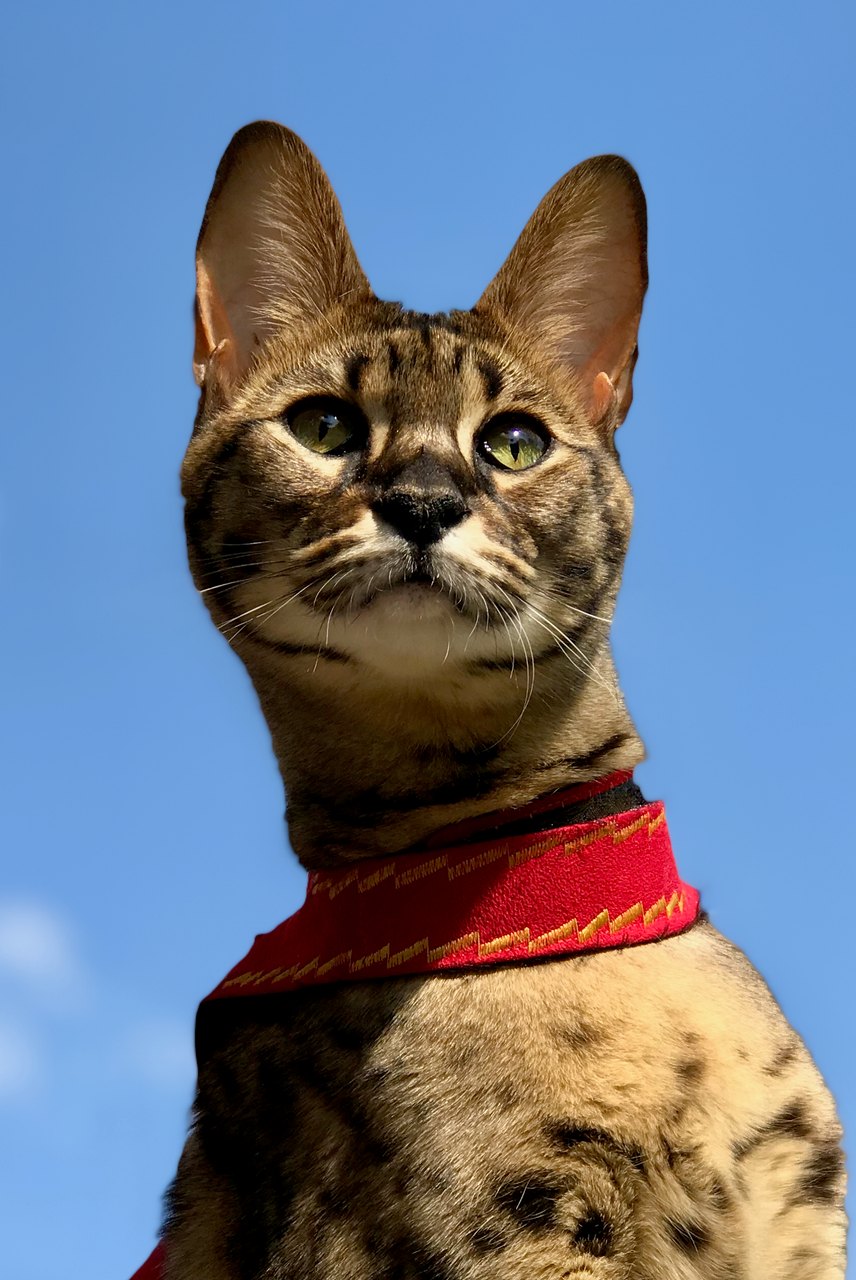
This sample closes and reopens its eyes, then slightly raises its head. The tall ears, green eyes and red harness remain recognizable. The light margins are visible in the result; exact blink counts and identity fidelity can vary.
Source photograph: Maxinjo; crop by YukiKoKo · CC0-1.0
R03 · 2026-10-14 · fal-ai/kling-video/v2.5-turbo/pro/image-to-video
Begin with the same open-eyed Savannah cat in the reference. The cat makes one slow, natural blink, fully reopening both eyes to the same original green eye color, then lifts its head just slightly. Preserve the exact tall ear shapes, muzzle, face proportions, asymmetric visible coat markings and red harness. Keep the body position, blue-sky background and camera almost still. Five calm seconds. No talking, yawning, eye-color change, exaggerated expressions, standing up, walking, new accessories, extra animals, text or scene cuts.
Images and videos are compressed for this page. The dimensions shown describe the downloadable original. Video previews use the delivered clip without changing its action or playback speed.
Free previews carry a watermark: images up to 768 px on the long side and videos at 480p. They remain available for 14 days. Original access requires purchased credits when checkout is available; unlocked works are kept for 90 days. Check the actual dimensions and expiry on the completed work.
View pricing and access →Uploads and generated files belong to your private workspace. Generation providers process the material you submit. Sharing is a separate choice; upload only material you have permission to use.
Read the data-handling notice →Use one JPG, PNG or WebP image up to 12 MB. The starting pose should already show the parts that need to move. A close face crop cannot provide reliable information about hidden paws.
Watch both eyes through the blink and compare the nose before and after it. Breathing should not inflate the whole body. The motion is newly generated, not recovered footage.
A reference image gives the model information to work from, but distinctive markings, proportions and expressions can change. Text-only creation invents a pet from your description. If exact documentary detail matters, retain the original photo alongside any AI interpretation.
Free previews carry a watermark: images up to 768 px on the long side and videos at 480p. They remain available for 14 days. Original access requires purchased credits when checkout is available; unlocked works are kept for 90 days. Check the actual dimensions and expiry on the completed work.
This editable preset guides the model. Review the result before keeping it; a preset is not a guarantee of likeness, exact motion or flawless editing.
Updated 2026-10-12
An AI dog video needs to work over time. A convincing poster frame does not tell you what happens when a paw moves, a head turns or a prop crosses the face.
Open the reference and finished clip, then record identity, motion and object-contact issues with times.
Your entries stay in this browser tab. Download a copy before leaving; this worksheet does not send messages or place orders.
Open your own source and result side by side. Files stay on this device. Images: JPEG, PNG or WebP up to 12 MB / 40 MP. Video: MP4 or WebM up to 150 MB.
Use the coffee-barista sample as an original fictional example of a short action. Notice whether the main action reads clearly. This is generated entertainment, not footage of a real trained dog performing the scene.
Check the face and coat against the input image at the start, middle and end. Look for an ear changing shape, a patch drifting or the muzzle becoming a different length. Save notes with times rather than relying on a general impression.
Watch where the paw meets a cup, desk or floor. Look for extra limbs, sliding contacts or objects appearing through the body. A scene can be appealing while still containing a flaw worth rejecting.
Open your reference and video locally above and record the exact filenames. Use the video generator for a new request only after you know which action or reference needs changing. The review tool does not edit or render an MP4.
An AI dog video thumbnail shows only one frame. To assess the clip, look for the reference image, the action requested and the complete playable result. Without the reference, you can comment on visible motion but cannot establish how faithfully it preserved that particular dog. The inspiration library keeps examples with their production context. Separate what you can see in the clip from what a caption claims about it, and avoid treating a highly polished opening frame as evidence for the ending.
Pay attention when a paw meets a prop, a muzzle approaches a microphone or the body changes direction. Look for sliding objects, merged edges, extra limbs and changes in scale. Pause if needed, then replay at normal speed so the movement is not judged only from isolated frames. A brief action can be visually coherent while still differing from the planned action; record those as separate observations. A clip that looks amusing is not automatically a faithful record of the input animal or requested movement.
An illustrative log might say: “Opening: recognizable face. Middle: left paw merges with cup. Ending: chest marking changes shape. Audio: none.” That gives another viewer a way to find the same moments without inventing a quality score. Include the file name or sample page so the note points to one exact clip. For creating another attempt, the AI dog video generator explains the workflow; for comparing animals under a similar action, use the AI pet video guide.
A private joke, a public social post and a memorial keepsake have different acceptance criteria. You may tolerate an exaggerated costume in a joke but reject an altered face in a memorial. Decide the intended use before hiding errors with captions or fast cuts. Save the reviewed file and describe it as generated. If the clip includes dialogue, add the separate checks in the talking dog guide. Successful playback proves that the video opens, while likeness and motion quality still require your judgment.
No. It is an original fictional AI sample with its own recipe and media record.
No. Review the complete movement and transitions.
The local player accepts a supported file within its stated size limit. Use your own time notes; the generator’s five-second limit is separate.