Made for this idea
Turn a quiet pet portrait into a small living moment: a blink and gentle breathing. Suitable when a familiar expression matters more than dramatic action.
Image to video
Make a short AI dog video from your own photos. Choose gentle motion, a cooking scene or English dialogue, then review the full five-second result.
Your next useful step
Choose your starting point, edit the instructions, and review the credit quote before generating. Current access conditions are shown in the creator.
Open the creatorIllustrative scenario, not a customer testimonial.
For a real pet photo, begin with one blink or head tilt. For a fictional dog chef, build the kitchen scene first. Neither request is the same as transferring exact dance motion from another video.
Gentle blink and breathing
Turn a quiet pet portrait into a small living moment: a blink and gentle breathing. Suitable when a familiar expression matters more than dramatic action.
Use an unobstructed face with open eyes and some chest visible. Ask for one blink, light chest movement and a locked camera; avoid a head turn in the same first attempt.
Watch both eyes through the blink and compare the nose before and after it. Breathing should not inflate the whole body. The motion is newly generated, not recovered footage.
Use one JPG, PNG or WebP image up to 12 MB. The starting pose should already show the parts that need to move. A close face crop cannot provide reliable information about hidden paws.
Describe motion instead of repeating the entire image. Keep changes modest: blink once, turn slightly, hold the pose. For large actions, prepare a full-body starting frame with space around the animal.
Check the quoted credits before submitting. When the work is ready, compare the face, edges and composition; for video, watch the beginning, middle and end. Download the accepted file from your library before its expiry date.
Image to video
This editable preset guides the model. Review the result before keeping it; a preset is not a guarantee of likeness, exact motion or flawless editing.
Animate the pet in the uploaded starting image. The pet gently blinks and breathes, with a still camera. Preserve its face, coat and body proportions. Smooth continuous movement, no captions or logos.Try the other starting point · Text to video →
These are individual tests with licensed photographs or a written prompt. Compare the details before choosing a workflow; each result can differ.
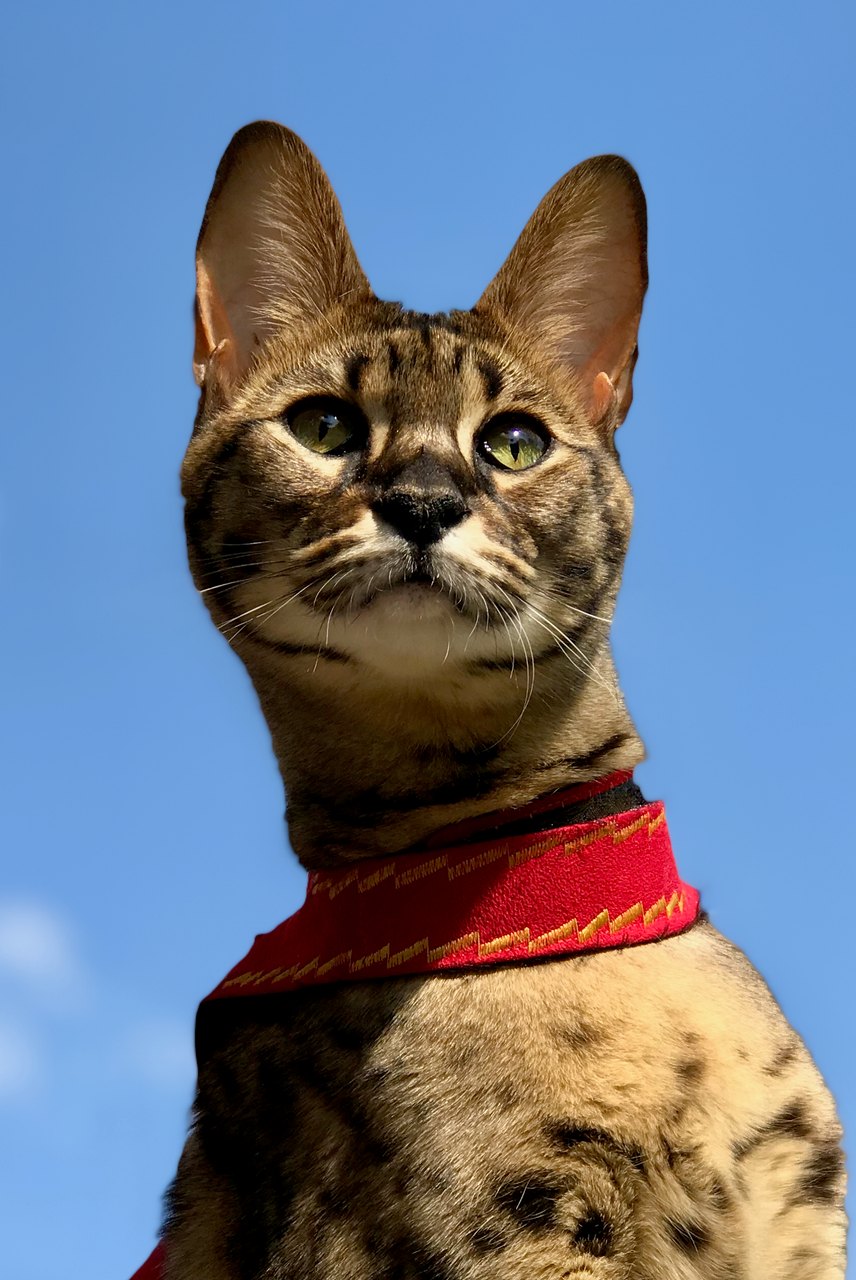
This sample closes and reopens its eyes, then slightly raises its head. The tall ears, green eyes and red harness remain recognizable. The light margins are visible in the result; exact blink counts and identity fidelity can vary.
Source photograph: Maxinjo; crop by YukiKoKo · CC0-1.0
R03 · 2026-10-14 · fal-ai/kling-video/v2.5-turbo/pro/image-to-video
Begin with the same open-eyed Savannah cat in the reference. The cat makes one slow, natural blink, fully reopening both eyes to the same original green eye color, then lifts its head just slightly. Preserve the exact tall ear shapes, muzzle, face proportions, asymmetric visible coat markings and red harness. Keep the body position, blue-sky background and camera almost still. Five calm seconds. No talking, yawning, eye-color change, exaggerated expressions, standing up, walking, new accessories, extra animals, text or scene cuts.
Images and videos are compressed for this page. The dimensions shown describe the downloadable original. Video previews use the delivered clip without changing its action or playback speed.
Free previews carry a watermark: images up to 768 px on the long side and videos at 480p. They remain available for 14 days. Original access requires purchased credits when checkout is available; unlocked works are kept for 90 days. Check the actual dimensions and expiry on the completed work.
View pricing and access →Uploads and generated files belong to your private workspace. Generation providers process the material you submit. Sharing is a separate choice; upload only material you have permission to use.
Read the data-handling notice →Use one JPG, PNG or WebP image up to 12 MB. The starting pose should already show the parts that need to move. A close face crop cannot provide reliable information about hidden paws.
Watch both eyes through the blink and compare the nose before and after it. Breathing should not inflate the whole body. The motion is newly generated, not recovered footage.
A reference image gives the model information to work from, but distinctive markings, proportions and expressions can change. Text-only creation invents a pet from your description. If exact documentary detail matters, retain the original photo alongside any AI interpretation.
Free previews carry a watermark: images up to 768 px on the long side and videos at 480p. They remain available for 14 days. Original access requires purchased credits when checkout is available; unlocked works are kept for 90 days. Check the actual dimensions and expiry on the completed work.
This editable preset guides the model. Review the result before keeping it; a preset is not a guarantee of likeness, exact motion or flawless editing.
Updated 2026-10-12
This AI dog video generator turns a selected dog profile into a short motion clip. Choose a quiet movement or a character scene such as a barista, podcast host or weather reporter. Scene templates create a new vertical image from your dog's references before animating it, so the example's breed does not become your input animal.
A seated dog can make a small head turn, blink or paw movement. A headshot provides little evidence for a full-body dance. The scene templates use a short, specific action rather than a chain of unrelated movements.
For cooking, the paw nudges or lifts one object. The disco scene uses small steps. These are generation requests; the finished video still needs to be checked for contact, anatomy and continuity.
This page filters for dog profiles. Pick clear photos of the same animal and avoid combining different ages or coat patterns. The generated scene should preserve the muzzle, ears, eye color and visible markings.
The pet video guide covers cross-species planning. Separate dog and cat results should be reviewed on their own; success with one subject does not establish performance with another.
Podcast and weather scenes include a short English line displayed in the workspace. Their generation path uses native audio. Other scenes are silent and can optionally use a song you have already unlocked.
A voice track does not prove accurate lip movement. Listen to the words, then watch the mouth and face through the whole line. The talking dog video guide includes a speech review and links to the speaking scenes.
A scene requires a frame-generation step followed by video generation. The quote includes both. One available free video try can make a marked scene preview; paid generation or unlocking uses the displayed credit amount.
After completion, play the whole five seconds. Check the beginning, the interaction with objects and the last frame. Look for extra limbs, a changing face, disappearing props and abrupt movement. A good opening frame is not a full video review.
For an AI dog video generator, a short action is easier to specify and inspect than a sequence of unrelated events. A dog can turn toward a microphone or nudge one object in the planned scene. Asking it to enter a room, cook, dance and speak creates several opportunities for identity and object continuity to change. Describe the start pose, the one action and the desired finish. The scene examples in the inspiration library show how a setting and action can be paired.
Character scenes first create a scene image from the pet references before animating it. That scene introduces clothing, props or a new environment, so examine the face and body in the finished clip rather than assuming the reference transferred unchanged. A recipe’s example animal is not the identity source for your new request. Your selected pet references control that role. If the face is already wrong in the scene, motion will not repair it; a clearer reference or simpler scene may be the better next attempt.
The supported speaking scenes use an editable English line within the displayed length limits. Keep it to one thought and listen for omitted or changed words in the completed clip. Then watch the muzzle with the sound off. Clear speech does not prove accurate mouth movement, and visible mouth motion does not prove the words are correct. The talking dog video guide and speech test examples make those checks concrete. A demonstrated English line does not establish support for every language or pronunciation.
Play the saved file from start to finish. Check object contact, paws, ears, face stability, background changes and the ending. Confirm the actual orientation and duration rather than inferring them from a thumbnail. The AI dog video review helps describe visible problems, and the video format guide helps if the intended output is actually a longer edit or slideshow. Keep the original reference and selected video together; a generated scene is creative output, not footage of the pet performing the action.
Use “Make this with my pet” on an inspiration example. Your selected photos provide the identity and the preset provides the setting and action.
These templates create short clips. They do not assemble a long film or guarantee exact choreography. Plan a longer sequence separately and review each shot.
The current speaking scenes let you edit a short English line, within the displayed limit of 14 words and 120 characters. They do not automatically add a pet name or clone a person's voice.
Keep the completed clip only after checking both the dog and the action it performs.