Made for this idea
Turn a quiet pet portrait into a small living moment: a blink and gentle breathing. Suitable when a familiar expression matters more than dramatic action.
Image to video
Review a cat or dog video against its own source and record the action, body continuity and background changes. Keep comparisons tied to actual inputs.
Your next useful step
Choose your starting point, edit the instructions, and review the credit quote before generating. Current access conditions are shown in the creator.
Illustrative scenario, not a customer testimonial.
A cat clip has stable movement but the facial patch changes halfway through. Compare that feature across several frames instead of judging only the motion; keep both the source and the rejected output notes so the next prompt is specific.
Gentle blink and breathing
Turn a quiet pet portrait into a small living moment: a blink and gentle breathing. Suitable when a familiar expression matters more than dramatic action.
Use an unobstructed face with open eyes and some chest visible. Ask for one blink, light chest movement and a locked camera; avoid a head turn in the same first attempt.
Watch both eyes through the blink and compare the nose before and after it. Breathing should not inflate the whole body. The motion is newly generated, not recovered footage.
Use one JPG, PNG or WebP image up to 12 MB. The starting pose should already show the parts that need to move. A close face crop cannot provide reliable information about hidden paws.
Describe motion instead of repeating the entire image. Keep changes modest: blink once, turn slightly, hold the pose. For large actions, prepare a full-body starting frame with space around the animal.
Check the quoted credits before submitting. When the work is ready, compare the face, edges and composition; for video, watch the beginning, middle and end. Download the accepted file from your library before its expiry date.
Image to video
This editable preset guides the model. Review the result before keeping it; a preset is not a guarantee of likeness, exact motion or flawless editing.
Animate the pet in the uploaded starting image. The pet gently blinks and breathes, with a still camera. Preserve its face, coat and body proportions. Smooth continuous movement, no captions or logos.Try the other starting point · Text to video →
These are individual tests with licensed photographs or a written prompt. Compare the details before choosing a workflow; each result can differ.
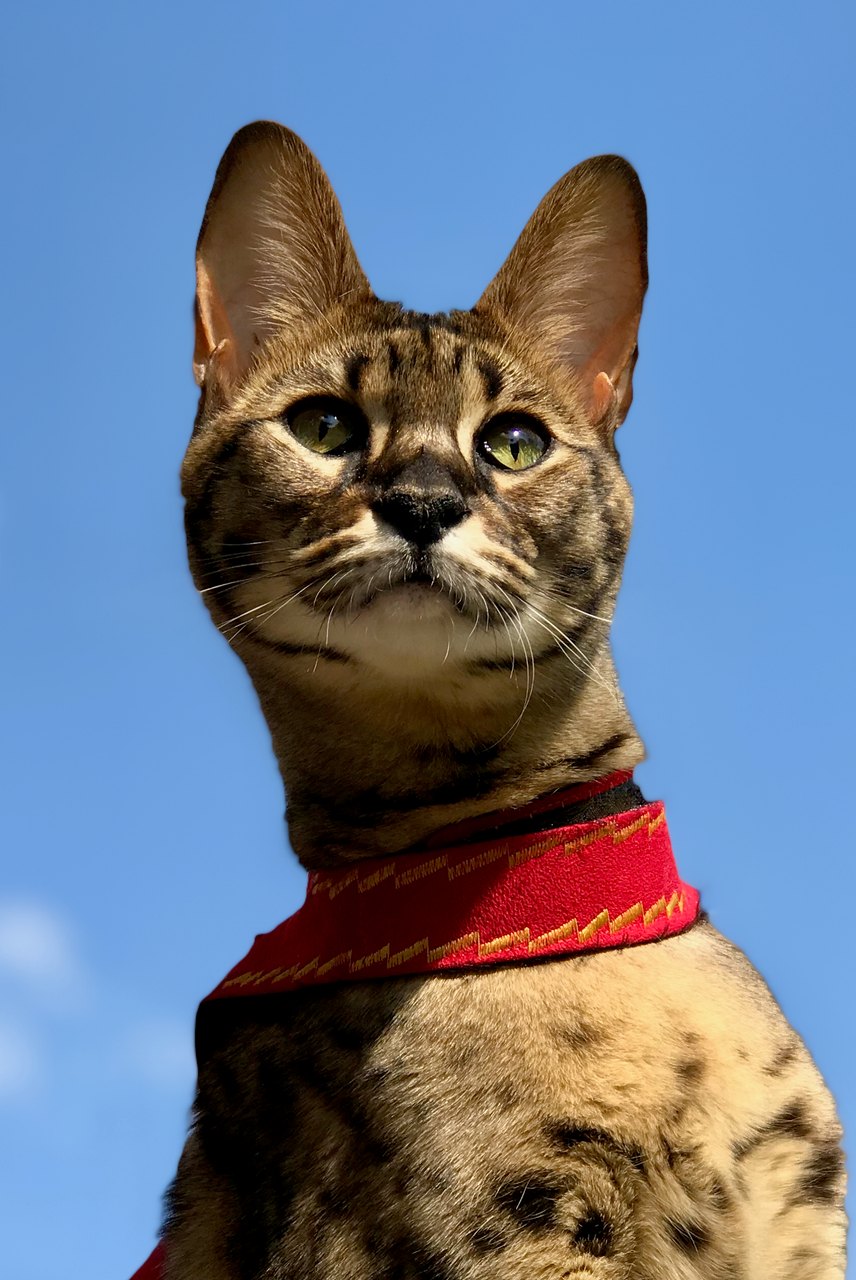
This sample closes and reopens its eyes, then slightly raises its head. The tall ears, green eyes and red harness remain recognizable. The light margins are visible in the result; exact blink counts and identity fidelity can vary.
Source photograph: Maxinjo; crop by YukiKoKo · CC0-1.0
R03 · 2026-10-14 · fal-ai/kling-video/v2.5-turbo/pro/image-to-video
Begin with the same open-eyed Savannah cat in the reference. The cat makes one slow, natural blink, fully reopening both eyes to the same original green eye color, then lifts its head just slightly. Preserve the exact tall ear shapes, muzzle, face proportions, asymmetric visible coat markings and red harness. Keep the body position, blue-sky background and camera almost still. Five calm seconds. No talking, yawning, eye-color change, exaggerated expressions, standing up, walking, new accessories, extra animals, text or scene cuts.
Images and videos are compressed for this page. The dimensions shown describe the downloadable original. Video previews use the delivered clip without changing its action or playback speed.
Free previews carry a watermark: images up to 768 px on the long side and videos at 480p. They remain available for 14 days. Original access requires purchased credits when checkout is available; unlocked works are kept for 90 days. Check the actual dimensions and expiry on the completed work.
View pricing and access →Uploads and generated files belong to your private workspace. Generation providers process the material you submit. Sharing is a separate choice; upload only material you have permission to use.
Read the data-handling notice →Use one JPG, PNG or WebP image up to 12 MB. The starting pose should already show the parts that need to move. A close face crop cannot provide reliable information about hidden paws.
Watch both eyes through the blink and compare the nose before and after it. Breathing should not inflate the whole body. The motion is newly generated, not recovered footage.
A reference image gives the model information to work from, but distinctive markings, proportions and expressions can change. Text-only creation invents a pet from your description. If exact documentary detail matters, retain the original photo alongside any AI interpretation.
Free previews carry a watermark: images up to 768 px on the long side and videos at 480p. They remain available for 14 days. Original access requires purchased credits when checkout is available; unlocked works are kept for 90 days. Check the actual dimensions and expiry on the completed work.
This editable preset guides the model. Review the result before keeping it; a preset is not a guarantee of likeness, exact motion or flawless editing.
Updated 2026-10-12
Comparing AI pet videos is useful only when the inputs and actions are clear. A quiet cat at a window and a dancing dog show different ideas; they are not a controlled test of which species animates better.
Record the source, intended action and observed animal motion; keep the limits of any comparison visible.
Your entries stay in this browser tab. Download a copy before leaving; this worksheet does not send messages or place orders.
Open your own source and result side by side. Files stay on this device. Images: JPEG, PNG or WebP up to 12 MB / 40 MP. Video: MP4 or WebM up to 150 MB.
Record the species, source image, requested action and output length. For a fairer personal comparison, keep the action and framing similar while noting unavoidable differences in the references. This page provides no measured cross-species success rate.
The rainy-window cat on this page is an original fictional sample with subtle motion. It gives you something concrete to inspect: blinking, head position and the relation between the cat and the window. It does not demonstrate every cat pose or action.
A camera push can make a still pose feel active. Record which motion comes from the animal and which comes from the camera or background. Check ears, tail and visible paws throughout rather than judging only overall activity.
Use the local player with each source and result, then download one record per output. Do not replace a weak result with an unrelated pet while keeping the same claim. Browse supported scene ideas or video workflow types for the next attempt.
An AI pet video comparison is more useful when the planned action is similar across subjects. A seated blink and a full-body dance test different things, regardless of whether the animal is a dog or cat. Keep the action, camera distance and review questions as consistent as the references allow. Record when a comparison is not fair because one photograph hides the body or uses a very different angle. Success with one animal does not establish the result you will get from another animal’s photograph.
A result can look like a plausible cat while losing the individual cat’s asymmetric markings. It can resemble a dog while changing the original muzzle or ears. Check both the general anatomy and the specific identity. For long fur, watch edges during movement; for a curled pose, watch whether hidden limbs unexpectedly appear. The dog video review supplies concrete motion checkpoints, while the AI portrait review helps describe identity before movement complicates the comparison.
If the planned action requires a visible body and the source is only a face crop, write that limitation in the plan. You can choose a smaller motion or find another authorized photograph. Do not turn an unsuitable input into a claimed failure of every model or every animal of that species. An illustrative note is “reference supports a head movement; full-body stepping cannot be checked from this image.” The note preserves what the evidence can support and gives you a practical next choice.
A single generated shot can be a playful scene or a quiet keepsake. A story spanning several real moments usually needs editing and a sequence plan. The video generator types distinguish photo animation, slideshows, editing and speech. If you are ready for a supported short scene, use the AI dog video workflow with an appropriate pet reference. Review the entire downloaded file, and keep the original photo separate from the generated movement so its origin remains understandable.
No. They are creative examples made from different fictional scenes.
Record it separately. It may make a pleasing clip without completing the requested animal action.
No. It plays a local file and records observations; generation is a separate workflow.