Made for this idea
A quiet portrait to keep privately or share with someone who welcomes it. Begin with a familiar expression; decorative symbolism is optional and should follow the recipient’s preference.
Image to image
Decide whether you need an original-photo layout, a restoration brief, an artist commission or new pet artwork, then prepare the right source material.
Your next useful step
Choose your starting point, edit the instructions, and review the credit quote before generating. Current access conditions are shown in the creator.
Illustrative scenario, not a customer testimonial.
Your priority is a new artistic keepsake, not repairing a torn photograph. Choose portrait creation for the former and restoration guidance for the latter; write that purpose first so the output is judged against the right task.
Pet remembrance portrait
A quiet portrait to keep privately or share with someone who welcomes it. Begin with a familiar expression; decorative symbolism is optional and should follow the recipient’s preference.
Choose the photo that feels most like the pet you remember, even if it is not the newest one. Note grey fur, uneven markings and features that must not be idealized away.
Compare the eyes, muzzle and age before judging the background. Keep the original photo too. An AI remembrance image is an interpretation and does not promise grief relief or a restored memory.
Upload one to five JPG, PNG or WebP references, each up to 12 MB. Start with a clear face and add another angle only when it explains a marking or body feature.
Say what should change and what should remain: for example, change the setting while keeping the ear shape, eye color and chest patch. Avoid combining an outfit, background, pose and lighting change in the first attempt.
Check the quoted credits before submitting. When the work is ready, compare the face, edges and composition; for video, watch the beginning, middle and end. Download the accepted file from your library before its expiry date.
Image to image
This editable preset guides the model. Review the result before keeping it; a preset is not a guarantee of likeness, exact motion or flawless editing.
Edit the uploaded pet photograph. Gentle pet remembrance portrait in a peaceful flower garden, no religious symbols. Preserve the pet’s recognizable face, coat markings and proportions. Do not add text or watermarks.Try the other starting point · Text to image →
These are individual tests with licensed photographs or a written prompt. Compare the details before choosing a workflow; each result can differ.
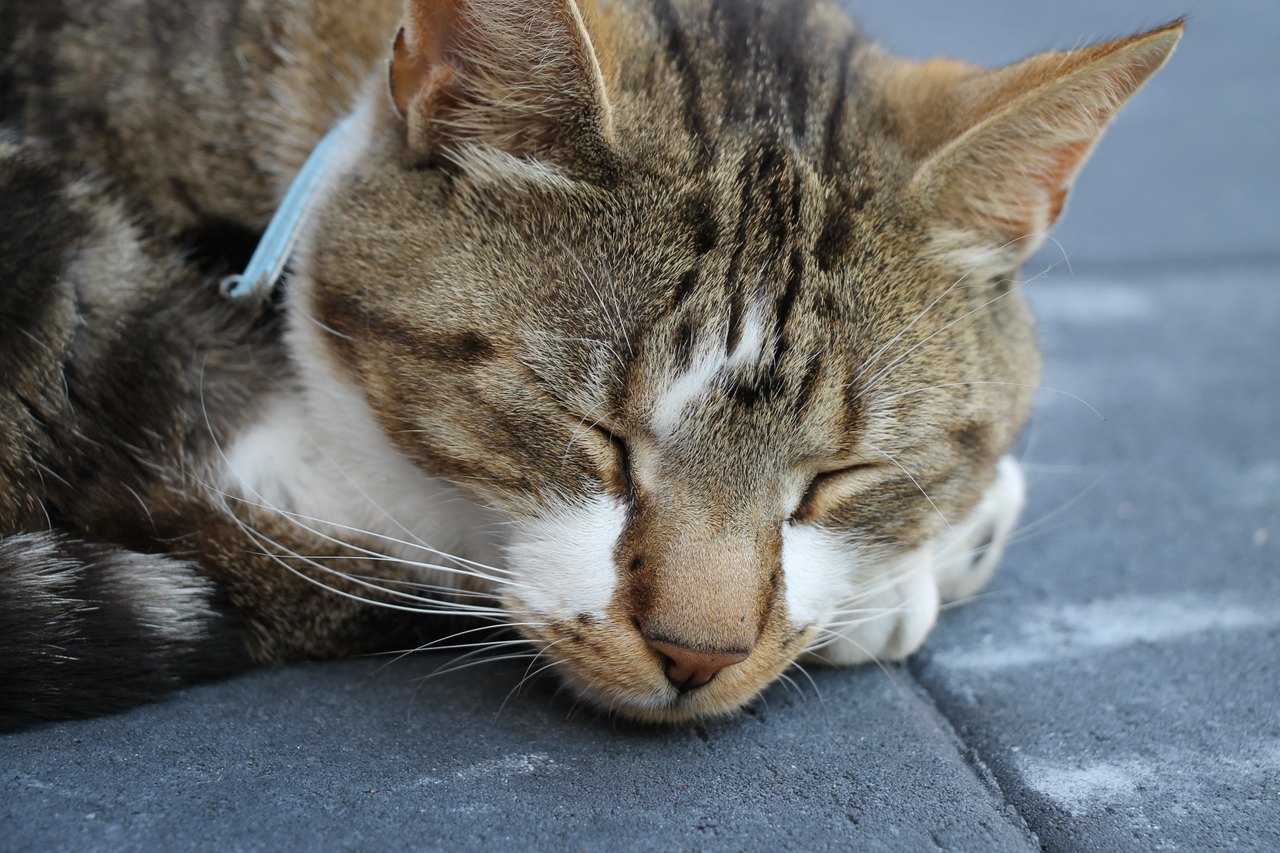
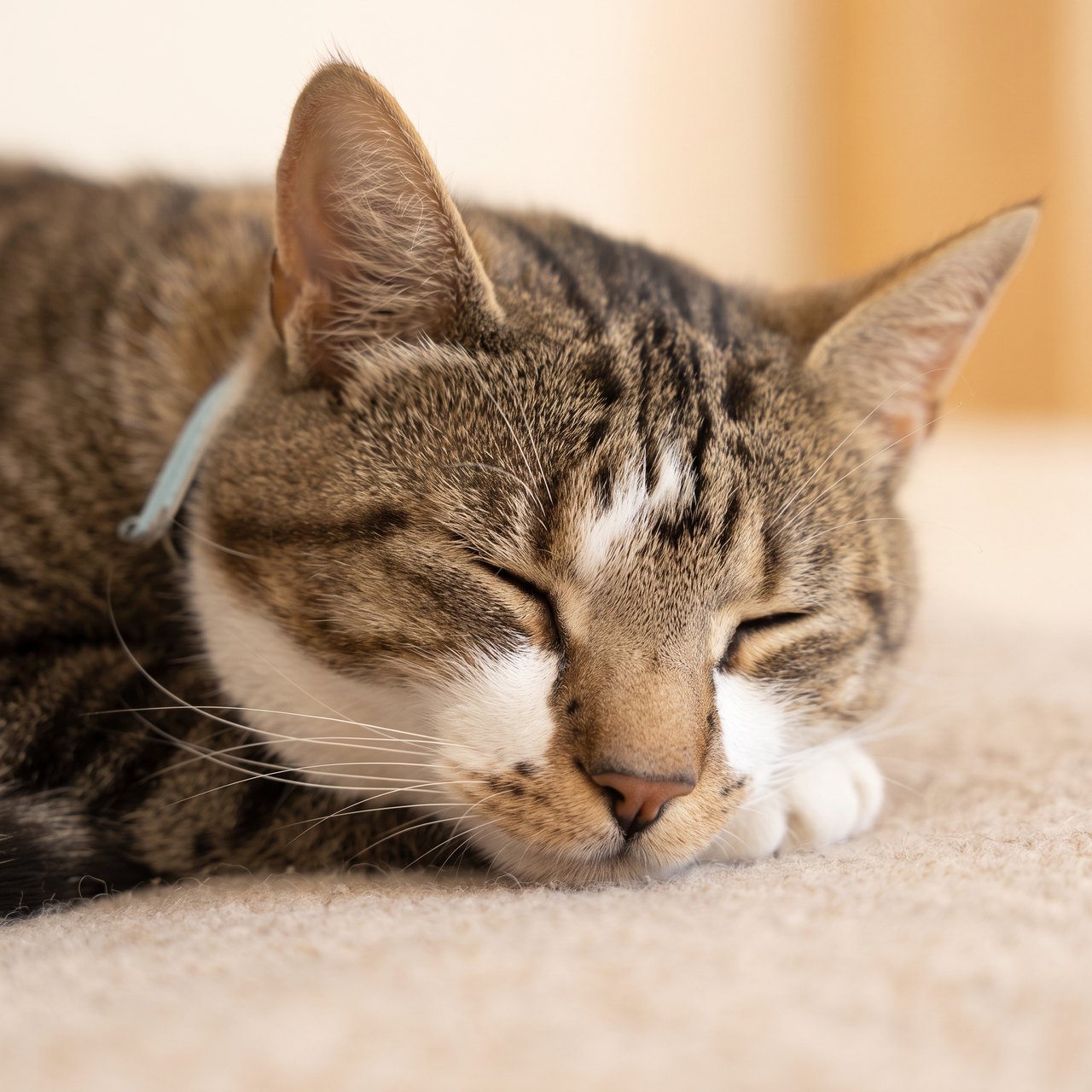
The closed eyes and main coat markings remain recognizable. Fine markings, whiskers and the surface beneath the cat were redrawn; no wings or halos were added. This is a hypothetical memorial test, with no claim about the photographed animal’s life status.
Source photograph: Roy Tanck · CC0-1.0
C04 · 2026-10-13 · fal-ai/nano-banana-2/edit
Make a quiet, restrained commemorative portrait using this exact resting cat as the reference. Preserve the closed eyes, facial proportions, ears, whiskers and visible fur markings. Keep the same natural resting expression and age, with a soft warm neutral background and gentle natural light. No angel wings, halos, rainbow, heavenly scene, candles, flowers, dates, name, text or invented objects. This is a calm artistic portrait, not a restoration of a real event.
Images and videos are compressed for this page. The dimensions shown describe the downloadable original. Video previews use the delivered clip without changing its action or playback speed.
Free previews carry a watermark: images up to 768 px on the long side and videos at 480p. They remain available for 14 days. Original access requires purchased credits when checkout is available; unlocked works are kept for 90 days. Check the actual dimensions and expiry on the completed work.
View pricing and access →Uploads and generated files belong to your private workspace. Generation providers process the material you submit. Sharing is a separate choice; upload only material you have permission to use.
Read the data-handling notice →Upload one to five JPG, PNG or WebP references, each up to 12 MB. Start with a clear face and add another angle only when it explains a marking or body feature.
Compare the eyes, muzzle and age before judging the background. Keep the original photo too. An AI remembrance image is an interpretation and does not promise grief relief or a restored memory.
A reference image gives the model information to work from, but distinctive markings, proportions and expressions can change. Text-only creation invents a pet from your description. If exact documentary detail matters, retain the original photo alongside any AI interpretation.
Free previews carry a watermark: images up to 768 px on the long side and videos at 480p. They remain available for 14 days. Original access requires purchased credits when checkout is available; unlocked works are kept for 90 days. Check the actual dimensions and expiry on the completed work.
This editable preset guides the model. Review the result before keeping it; a preset is not a guarantee of likeness, exact motion or flawless editing.
Updated 2026-10-12
A memorial portrait can preserve an existing image or create a new interpretation. Those are different goals. Choose the output you actually want before deciding whether a generator belongs in the process.
Use the condition of the source and the intended result to choose restoration, illustration or a maker’s brief.
Your entries stay in this browser tab. Download a copy before leaving; this worksheet does not send messages or place orders.
If the exact expression, setting and moment are important, begin with the original file and a print layout. Cropping and fitting change presentation without needing a newly imagined scene. The print calculator does not repair missing detail.
For a damaged photograph, list the visible damage and keep an untouched scan. The restoration workflow still needs comparison with the source; a cleaner-looking result should not automatically be treated as a more accurate record.
If you want an artist’s particular medium or process, ask that artist about revisions, materials and delivery. The custom portrait brief records these questions. This page does not hire or certify a maker.
For a new pet artwork, choose a style and document details that must stay recognizable. The AI memorial source map separates observed information from allowed invention before you generate.
A memorial portrait generator can refer to very different processes. Photo layout preserves the photo while adding a border or words. Photo restoration edits damage or exposure. An artist commission interprets the reference through a person’s drawing process. AI generation creates a new image guided by the input. Begin by deciding what must stay photographic and what may change. That decision is more useful than comparing services that deliver different kinds of objects under the same label.
For a photo layout, supply the original file, crop, exact text and intended dimensions. For an artist, ask how references, proofs and revisions work, and whether the final delivery is digital or physical. For AI, describe the individual markings and the changes you accept, then inspect the result. A request for “the same photo but painted” is incomplete unless you explain which details must remain. The photo reference guide can help prepare the source before you decide who or what will make the work.
Suppose the only image is an old printed photograph with a crease across an otherwise clear face. If the goal is to preserve that photograph, investigate a restoration workflow first. If the photo is clear but the room is distracting, a cropped layout may solve the problem. If you want an entirely different visual style, a drawn or generated interpretation may fit. These are hypothetical choices, not evidence that any damaged feature can be recovered exactly. Keep the scan unchanged so you can always return to it.
Describe the object you want to keep: one downloadable image, a print-ready file, a mounted print, or an original painting. Then ask who supplies each part, who checks the proof and what happens if the likeness is wrong. A price attached to one digital file cannot be compared directly with a hand-painted physical work without those details. The custom pet portrait comparison organizes the questions. Once the route is clear, use the appropriate tool rather than assuming every search result provides the same service.
No. The choice depends on whether the original moment, a maker’s process or a new interpretation is the priority.
The studio creates digital outputs. Physical painting, printing and shipping require a separate maker.
The creation tools linked here are pet workflows. Broader human portrait services are outside their scope.